What is SNBC? | | SNBC stands for Special Needs Basic Care. SNBC is a specific managed care program and may offer additional benefits and care coordination to people with certified disabilities, age 18-64, who are enrolled in MA. To be enrolled in SNBC, individuals must have active Medical Assistance (MA) coverage. However, MA coverage alone does not guarantee enrollment in SNBC. Enrollees who have been certified blind or disabled by the Social Security Administration (SSA) or the State Medical Review Team (SMRT) are automatically enrolled in non-integrated SNBC, within 30 days of being eligible, if they don’t choose a plan or opt-out, if they don't have a spenddown. They can choose to opt-out, or disenroll, at any time. There are two SNBC products: MA17 Integrated SNBC and MA37 SNBC Integrated SNBC (I-SNBC): - Combines Medical Assistance (MA) and Medicare benefits into a single managed care plan.
- Includes Medicare Part D coverage for prescription drugs.
- Offers coordinated care through a single health plan, simplifying access to services.
Non-Integrated SNBC (SNBC- NI) - Covers only MA services through a managed care plan.
- Does not include Medicare benefits—Medicare benefits are not included—enrollees with Medicare must handle their coverage separately.
- May provide additional services beyond standard MA, such as care coordination and wellness programs.
Other resources: |
What is MSHO? | | MSHO stands for MN Senior Health Options. MSHO is a managed care plan for age 65+. MSHO plans offer a range of supplemental benefits and coordinated care beyond what's typically covered by MA and Medicare alone. To participate in MSHO, enrollees must have active MA coverage. However, individuals can have MA coverage without being enrolled in MSHO. Other resources: |
What is the difference between MA and MSHO/SNBC? | | Medical Assistance (MA) is Minnesota’s Medicaid program. It provides basic health coverage for low-income individuals, including some people with disabilities and seniors. - MSHO and SNBC are optional managed care programs within MA that may offer enhanced services and care coordination for certain populations:
- SNBC is for people ages 18–64 with disabilities who have MA. It may offer additional benefits and care coordination services.
- MSHO is for people 65 and older who have both MA and Medicare. It combines MA and Medicare services into one coordinated plan, often with added supports.
|
How is my spenddown determined, and why do I have one? - Why do I have a spenddown?
- No one told me I had a spenddown.
- Why is my spenddown this amount?
- Who determines eligibility for a spenddown?
| | Eligibility - The county has determined that you are eligible for Medical Assistance (MA) with a spenddown. MSHO and SNBC are managed care products and are distinct from standard MA coverage. For any questions regarding MSHO, SNBC, or program eligibility, please contact your county worker. Notices - MA Eligibility Notice: MAXIS issues a notice informing consumers of their MA eligibility and spenddown amount.
- MSHO and SNBC Notices:
- a Health Plan Enrollment notice will be mailed to the enrollee once they are successfully enrolled in MSHO or SNBC
- MMIS also issues a Health Plan Disenrollment Notice when MSHO or SNBC coverage ends.
These notices can be accessed in MMIS under Recipient Miscellaneous Functions (RKE2). However, viewing is restricted, and printing will generate a print job at the IOC. |
I can’t afford to pay the spenddown | | If you are unable to pay your spenddown, you can voluntarily disenroll from the MSHO and SNBC program and return to Fee-for-Service (FFS) MA (also known and commonly referred to as straight MA). However, you will still have your spenddown. You will pay your spenddown directly to your providers. Each month, they will bill you until your full spenddown is paid. - How is the spenddown determined?
- Refer to County worker to review for accuracy.
- What are the options if they can’t afford the spenddown?
- Refer to county worker for assistance in applying for other programs.
- Refer to Disability Hub and/or Senior Linkage Line for assistance in understanding your options and how your spenddown works.
|
I should not have a spenddown. | | If you believe your spenddown was determined incorrectly, you must discuss this with your county worker and provide all necessary information to reassess your eligibility. The Billing Team reviews MMIS to verify if the spenddown has been removed or modified and will adjust accordingly. If the invoice aligns with MMIS records, billing will refer the consumer to the county. Since the Billing Team cannot close your billing account until notified by the SNP team, you may continue receiving invoices even after your county worker ends your MSHO or SNBC coverage. However, invoices for months in which you did not receive MSHO or SNBC coverage will be adjusted to zero. To confirm that the Billing Team is responsible for billing the spenddown, review the following MMIS screens: - RELG: Displays active MA eligibility and coverage with a spenddown.
- RPPH: Shows active MSHO or SNBC enrollment.
- RSPD and RSPL: Confirm spenddown TYPE as AMM with no S Client Option number.
|
When do I have to pay these bills by before my MSHO/SNBC ends? I was closed due to non-payment, what do I have to do to get back on? | | Billing Cycle - January 4th: DHS mails an invoice for the payment due on February 15th, which covers the March spenddown.
- Disenrollment Policy: If you do not pay your spenddown for a total of 90 days while enrolled in SNBC or MSHO, DHS will disenroll you from the health plan. These missed months do not need to be consecutive.
- Reenrollment Requirements: If disenrolled, you must pay DHS the entire outstanding medical spenddown amount within 90 days to regain SNBC or MSHO enrollment. You must contact the HC Billing team to notify that you’ve paid the past due spenddown balance. HC Billing will notify SNP and Managed Care to review for re-enrollment. However, you will not be able to reenroll in MSHO or SNBC if you have past-due amounts owed to DHS.
|
I have not or did not get an invoice for my spenddown. | | Invoices for Spenddowns - It may take up to 4 weeks from the date of approval or when the change was processed by the county worker before you receive your initial invoice(s) from DHS.
Internal Process: - Billing is a manual process.
- New eligibility and changes in MMIS are identified through a monthly report generated on capitation day.
- The SNP team reviews the report first, then informs the Billing team about new accounts and necessary changes to existing accounts.
- The SNP team may take up to 5 days to complete their review.
- The Billing team may take up to 5 days to finalize their review and generate invoices.
|
What is the billing cycle | | MSHO and SNBC Billing Cycle - Billing takes place on the night of the 4th of each month.
- A batch or print job is generated for all invoices that need to be mailed to program enrollees.
- Invoices are dated the 4th and bill for the current month plus two.
Example: An invoice generated on January 4 is due February 15 and covers March coverage. - The invoice due date is always the 15th of the following month.
Example: An invoice dated January 4 will have a due date of February 15. - On the 5th of each month, invoices are printed and prepared for mailing by the IOC.
MSHO Invoice Details - H5514 is the SWIFT business unit for MSHO.
- H5516 is the SWIFT business unit for SNBC.
|
How do I pay for my spenddown? | | DHS Payment Options for MSHO and SNBC billing accounts with the HC Billing Team - Mail: Send payments to PO Box 64835, St. Paul, MN 55164-0835.
- Always include your invoice stub or write your Customer Number on your payment. Your Customer Number is listed on your invoice.
- Online: DHS Payment Portal
- Self-service payment website.
- Requires a Customer Number to make a payment.
- Offers one-time payments or monthly recurring payments (consumer manages account setup, changes, and cancellations).
- If you need assistance with error messages or locating your Customer Number, call the HC Billing phone line at 651-431-3205.
- In-Person:
- Elmer L. Andersen Building – 540 Cedar Street, St. Paul, MN 55115
- Business hours: Monday–Friday, 8:00 AM to 4:00 PM (excluding holidays).
- Accepts cash, checks, and money orders only (no debit or credit cards).
- No change provided for cash payments.
Important Note: This is only a payment center—staff here cannot answer eligibility, billing, or account inquiries. For billing questions, call the Billing phone line. For eligibility questions, contact your county worker. Alternative Payment Option - Bill Pay through a personal financial institution/bank (consumer assumes full responsibility).
- Pay to: DHS MSHO or SNBC
- Address: PO Box 64835, St. Paul, MN 55164-0835
- Account Number: Customer Number / SWIFT ID (found on your invoice).
- Memo: Include the program name (MSHO or SNBC).
Note: Always include your invoice stub or write your Customer Number on your payment. Your Customer Number is listed on your invoice. |
What is my current account balance, including my spenddown amount, past due payments, credits, and total owed? - What is the spenddown amount due?
- Do I have a past due spenddown amount?
- How will I know if I have a past due spenddown?
- Do I have a credit on my account?
- What is my account balance?
- Did you receive my payment?
- How much do I owe?
| - Billing Team
- County Worker
| HC Billing Team only bills for select SNBC and MSHO spenddown consumers. - RPPH must have SNBC or MSHO
- Spenddown Type in MMIS is AMM
- NPI cannot be listed in spenddown month
- Recipient amount exists
- Not coded with S Number for COS (Client Option Spenddown)
Contact the Billing Team for: - The spenddown amount being billed.
- Account balance, including credits, payments, and past-due spenddown amounts.
- Invoice inquiries—must call for details, as invoices do not show credits, payments, or past-due amounts.
- Questions regarding invoices and billing accounts.
Contact the County Worker for: - The spenddown amount based on eligibility.
- Eligibility-related questions, such as how the spenddown amount was determined.
Important Note: County workers do not have access to SWIFT and cannot address billing or account-related inquiries. All billing questions should be directed to the Billing Team. |
I received a notice that my spenddown ended, why? | | Determining the Reason for Disenrollment - If you received a Health Plan Disenrollment Notice, the reason for closure should be listed on the notice. If you have more questions, call the Agency that sent you the letter.
- If you did not receive a disenrollment notice, check what other notice you received and review its details.
If disenrollment notice states for unpaid spenddowns: Check for Non-Payment Closure notes in MMIS: - Review Notes: Access the RSUM screen and press F4 to review notes related to the case.
- Note Example: Per DHS Accounting Dept, (NAME) failed to pay his/her past due spenddown amount. Disenrolled from (UCARE MA17) Eff. 08/31/24. Entered US Exclusion eff. 9/01/24.
- Review RPPH: Check for an MSHO or SNBC span with an end date. Look for a reason code and press F12 for its definition. The non-payment of spenddown code is SP.
- Review RELG: Confirm whether MA coverage is active (A00) or closed for an eligibility reason.
Who to Contact: - For Non-Payment Closures: Call the Billing phone line at 651-431-3205.
- If Both MA and MSHO/SNBC Are Closed: Contact your county worker for assistance.
|
I no longer want SNBC. | - County Worker
- Disability Hub
| All enrollees in SNBC have the right to opt out of SNBC monthly and return to FFS. If you wish to discontinue your SNBC enrollment, you must contact your county worker to discuss your eligibility and available options. Since the Billing Team cannot close your billing account until they receive notification from the SNP team or an update in MMIS, you may continue receiving invoices even after your county worker ends your MSHO or SNBC enrollment. However, invoices for months in which you did not receive SNBC coverage will be adjusted to zero. Disability Hub: - Individuals can contact the Hub to explore their SNBC or Fee-for-Service (FFS) options.
- To disenroll or opt out of non-integrated SNBC, submit the SNBC Choice Form to DHS.
Managed Care Plan: - For integrated SNBC, contact your health plan to initiate disenrollment or enroll in a Part D: Medicare Part D drug plan, which will trigger auto-disenrollment from SNBC. A member may also submit a request to disenroll from SNBC. Statement must be signed and dated by member or AREP and include PMI (for reference).
|
What is a care coordinator and who is that person? | | Benefits of a Care Coordinator or Navigator: - Navigating Services: Helps you understand and access available healthcare services.
- Resource Referrals & Additional Support: Connects you with non-medical resources such as housing support, mental health services, and community organizations.
- Education & Wellness Support: Provides guidance on medical conditions, preventive screenings, medications, treatment options, and connects you to healthcare providers.
Your Rights Regarding Care Coordination: - Receive Care Coordination: You have the right to assistance from a dedicated care coordinator or navigator.
- Decline or Limit Care Coordination: If you prefer not to receive care coordination or want to reduce contact, notify your health plan.
If a person does not know who their care coordinator is they should call the MCO member services. That number is on their member card and can also be found on the RPPH screen by placing cursor on Plan ID and hitting F4. |
Who is my worker? I cannot get a hold of my worker, who else can I talk to? | - County
- Billing Team
- Disability Hub
| In MAXIS - Function: Case
- Command: Note
- Place cursor on X-number on bottom left of screen
- Hit F1 for worker information
|
Special Needs Purchasing (SNP) Team | | - What does this team do?
- When should they be contacted and who can contact them?
|
Disability Hub | | - When should program enrollees be referred to the Disability Hub?
- The Hub cannot enroll or determine eligibility for any programs, so should not be referred to for assistance with completing applications, determining eligibility, enrolling in any programs, or for things that the county/lead agency or DHS is responsible for. The Hub does not manage complaints for programs either – the Ombudsman offices should be used for complaints or issues as described for each Ombudsman office. If something needs to be ‘fixed’, people should not be referred to the Hub, but instead to the entity that can fix it.
- What can the Disability Hub assist with?
- The Hub can help people understand their options for programs and services, can help people understand the impact of working on their benefits, and can help people contact county/lead agencies, DHS, or other organizations to help people identify issues and help people know what to say to get resolution. The Hub helps people understand how the system works, what steps to take, and consider their options.
|
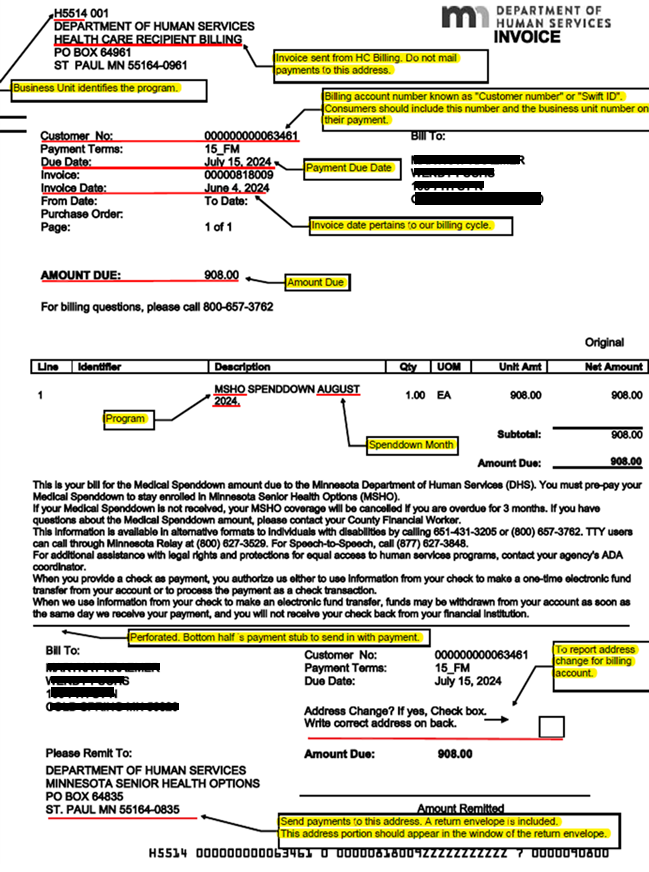 HC Billing Invoice Example